RAG Memory Configuration
Memory benchmarks (full N=500, gpt-4o reader): 85.6% on LongMemEval-S at $0.0090 per correct, +1.4 points above Mastra Observational Memory (84.23%). 70.2% on LongMemEval-M on the 1.5M-token / 500-session haystack variant — the only open-source library on the public record above 65% on M with publicly reproducible methodology. Competitive with the strongest published M results in the LongMemEval paper (Wu et al., ICLR 2025: round Top-5 65.7%, session Top-5 71.4%, round Top-10 72.0%). Benchmarks · Run JSONs · SOTA writeup
AgentOS provides three levels of memory API:
Memory— Primary SQLite-first facade for persistent local memory, ingestion, import/export, graph memory, and self-improving consolidation.AgentMemory— Compatibility facade that can wrap eitherCognitiveMemoryManageror the standaloneMemoryengine.- Low-level RAG primitives —
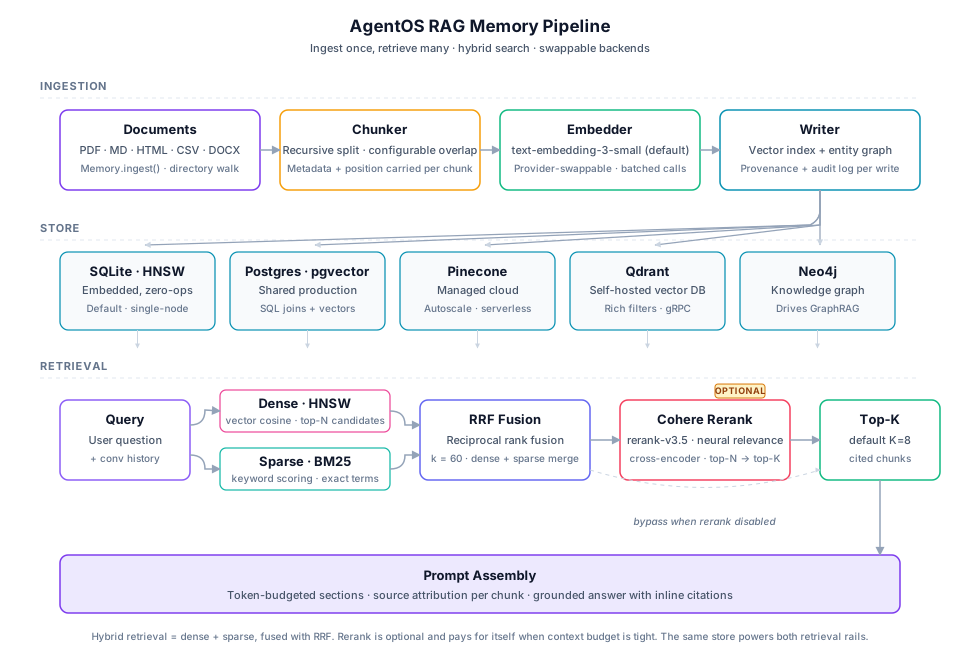
EmbeddingManager,VectorStoreManager,RetrievalAugmentor,UnifiedRetriever,GraphRAGEnginefor custom pipelines.
Memory.create() currently supports the SQLite-backed standalone memory facade at runtime. Postgres, Qdrant, Pinecone, and other backends are available through the lower-level RAG/vector-store layer.
Runtime truth: ragConfig and the standard AgentOS bootstrap still create the classic RetrievalAugmentor path. UnifiedRetriever exists as an opt-in orchestration layer for hosts that explicitly wire it in.
Standalone Memory Facade
import { Memory } from '@framers/agentos';

const mem = await Memory.createSqlite({
  path: './brain.sqlite',
  graph: true,
  selfImprove: true,
});

await mem.remember('User prefers dark mode', { type: 'semantic', tags: ['prefs'] });
await mem.ingest('./docs');
await mem.importFrom('./notes.csv', { format: 'csv' });

const hits = await mem.recall('dark mode');
await mem.export('./vault', { format: 'obsidian' });
await mem.close();
To expose the memory editor tools to AgentOS at runtime, either register the tools directly or load them through the extension system:
import { createMemoryToolsPack, Memory } from '@framers/agentos';

const memory = await Memory.createSqlite({ path: './brain.sqlite', selfImprove: true });

// Direct registration
for (const tool of memory.createTools()) {
  await agentos.getToolOrchestrator().registerTool(tool);
}

// Or extension-based registration through the shared tool registry
await agentos.getExtensionManager().loadPackFromFactory(
  createMemoryToolsPack(memory),
  'memory-tools',
);
If you already bootstrap AgentOS, you can auto-load the same pack directly
from AgentOS.initialize():
import { AgentOS, Memory } from '@framers/agentos';

const memory = await Memory.createSqlite({ path: './brain.sqlite', selfImprove: true });
const agentos = await AgentOS.create({
  memoryTools: {
    memory,
    includeReflect: true,
    identifier: 'primary-memory-tools',
    manageLifecycle: true,
  },
});
manageLifecycle is optional. Leave it unset when your app owns the
Memory instance and closes it outside AgentOS.
memoryTools only registers the tool pack. It does not automatically make the
same Memory instance the prompt-time longTermMemoryRetriever or
rollingSummaryMemorySink.
If you want one standalone Memory backend to power all three paths, use the
unified standaloneMemory config bridge:
import { AgentOS, Memory } from '@framers/agentos';

const memory = await Memory.createSqlite({ path: './brain.sqlite', selfImprove: true });
const agentos = await AgentOS.create({
  standaloneMemory: {
    memory,
    manageLifecycle: true,
    tools: { includeReflect: true },
    longTermRetriever: true,
    rollingSummarySink: true,
  },
});
This keeps memory tools available to agents while also reusing the same store for long-term prompt injection and rolling-summary persistence.
High-Level API: AgentMemory
import { AgentMemory } from '@framers/agentos';

// Option A: wrap an existing CognitiveMemoryManager
const cognitive = AgentMemory.wrap(existingManager);

// Option B: create a standalone SQLite-backed adapter
const memory = await AgentMemory.sqlite({ path: './brain.sqlite' });

// Store information
await memory.remember('User prefers dark mode');
await memory.remember('Deploy by Friday', { type: 'prospective', tags: ['deadline'] });

// Recall relevant memories
const results = await memory.recall('what does the user prefer?');
for (const m of results.memories) {
  console.log(m.content, m.retrievalScore);
}

// Standalone-only extras from the new Memory engine
await memory.ingest('./docs');
await memory.export('./vault', { format: 'obsidian' });

// Cognitive-only APIs remain available on the wrapped manager path
await cognitive.observe('user', 'Can you help me debug this?');
const context = await cognitive.getContext('TMJ treatment', { tokenBudget: 2000 });

await cognitive.remind({
  content: 'Remind about deploy deadline',
  triggerType: 'time',
  triggerAt: Date.now() + 3600000,
});

// Consolidation (merge, strengthen, decay)
await memory.consolidate();

// Health diagnostics
const health = await memory.health();

// Access underlying backends when needed
const rawManager = cognitive.raw;
const rawMemory = memory.rawMemory;
Use Memory directly for most local-first or ingestion-heavy workloads. Use AgentMemory when you want a compatibility facade across both backends, or when you specifically need cognitive-only APIs such as observe(), getContext(), or remind().
Observational Memory
Observational memory is a background system that compresses long-running conversation history into dense, searchable memory traces. Instead of keeping the entire conversation in context, the system progressively distills it through three tiers:
Recent Messages (raw conversation turns)
  → Observations (concise notes extracted by MemoryObserver)
    → Reflections (long-term memory traces produced by MemoryReflector)
How It Works
- ObservationBuffer accumulates every message fed via
observe(). It tracks approximate token count (~4 chars/token). - MemoryObserver activates when the buffer reaches 30,000 tokens. It sends buffered messages to a cheap LLM, which extracts typed observation notes (
factual,emotional,commitment,preference,creative,correction). The LLM prompt is biased by the agent's HEXACO personality traits — high Emotionality focuses on tone shifts, high Conscientiousness on deadlines, high Openness on creative tangents. - MemoryReflector accumulates observation notes. When they exceed 40,000 tokens, it consolidates them into long-term
MemoryTraceobjects with 5-40x compression. Conflict resolution is personality-driven: high Honesty prefers newer information and supersedes old traces; high Agreeableness keeps both versions.
Integration with RAG
Reflection traces are encoded into the vector store via CognitiveMemoryManager.encode(), making them searchable through the standard RAG pipeline. When HyDE is enabled, a query like "what did we decide about deployment?" generates a hypothetical answer, and that embedding finds relevant reflection traces alongside regular memories.
Superseded traces are soft-deleted so they no longer surface in retrieval results.
API
The high-level entry point is AgentMemory.observe():
// Feed every conversation turn to the observer
await memory.observe('user', userMessage);
await memory.observe('assistant', assistantResponse);
Internally, CognitiveMemoryManager.observe() orchestrates the full pipeline: buffer → observer → reflector → encode traces → soft-delete superseded.
Configuration
Enable observational memory in CognitiveMemoryConfig:
await memory.initialize({
  // ... core config ...
  observer: {
    activationThresholdTokens: 30_000, // trigger observation extraction
    llmInvoker,                         // (system, user) => Promise<string>
  },
  reflector: {
    activationThresholdTokens: 40_000, // trigger reflection consolidation
    llmInvoker,
  },
});
Both thresholds can be tuned. Lower thresholds produce more frequent, finer-grained observations at higher LLM cost. Higher thresholds batch more context but risk losing detail.
In persona JSON, the observer/reflector activate automatically when memoryConfig.enabled = true and an llmInvoker is available. No additional persona-level config is required.
Low-Level RAG Primitives
The concrete RAG APIs live under @framers/agentos/cognition/rag:
EmbeddingManager— Text → vector embeddings (OpenAI, Ollama, custom providers)VectorStoreManager— HNSW/InMemory vector storage with similarity searchRetrievalAugmentor— Default runtime RAG pipeline for embedding + search + context assemblyUnifiedRetriever— Opt-in plan-aware orchestration across multiple retrieval sourcesHydeRetriever— Hypothetical Document Embedding for better recall (generates pseudo-answers before searching)GraphRAGEngine— TypeScript-native graph-based RAG with knowledge graph traversal
For most standalone and local-first use cases, prefer Memory. Use AgentMemory when you need the compatibility layer or the cognitive observer/reflector APIs.
Enabling RAG In AgentOS
There are two supported ways to provide an augmentor to GMIs.
Option A: Provide a ready retrievalAugmentor instance
You construct and initialize the augmentor yourself, then pass it into AgentOS.initialize():
import { AgentOS } from '@framers/agentos';
import { EmbeddingManager, VectorStoreManager, RetrievalAugmentor } from '@framers/agentos/cognition/rag';
import { AIModelProviderManager } from '@framers/agentos/core/llm/providers/AIModelProviderManager';

// 1) Provider manager (must support embeddings for your chosen embedding model)
const providers = new AIModelProviderManager();
await providers.initialize({
  providers: [
    {
      providerId: 'openai',
      enabled: true,
      isDefault: true,
      config: { apiKey: process.env.OPENAI_API_KEY },
    },
  ],
});

// 2) Embeddings
const embeddingManager = new EmbeddingManager();
await embeddingManager.initialize(
  {
    embeddingModels: [
      { modelId: 'text-embedding-3-small', providerId: 'openai', dimension: 1536, isDefault: true },
    ],
  },
  providers,
);

// 3) Vector stores + data sources
const vectorStoreManager = new VectorStoreManager();
await vectorStoreManager.initialize(
  {
    managerId: 'rag-vsm',
    providers: [
      {
        id: 'sql-store',
        type: 'sql',
        storage: { filePath: './data/agentos_vectors.db', priority: ['better-sqlite3', 'sqljs'] },
      },
    ],
    defaultProviderId: 'sql-store',
    defaultEmbeddingDimension: 1536,
  },
  [
    {
      dataSourceId: 'voice_conversation_summaries',
      displayName: 'Conversation Summaries',
      vectorStoreProviderId: 'sql-store',
      actualNameInProvider: 'voice_conversation_summaries',
      embeddingDimension: 1536,
      isDefaultIngestionSource: true,
      isDefaultQuerySource: true,
    },
  ],
);

// 4) Retrieval augmentor
const rag = new RetrievalAugmentor();
await rag.initialize(
  {
    defaultDataSourceId: 'voice_conversation_summaries',
    categoryBehaviors: [],
  },
  embeddingManager,
  vectorStoreManager,
);

// 5) Pass into AgentOS
const agentos = await AgentOS.create({
  retrievalAugmentor: rag,
  manageRetrievalAugmentorLifecycle: true,
});
Option B: Let AgentOS create the RAG subsystem (ragConfig)
If you don’t want to manage instantiation, use AgentOSConfig.ragConfig. AgentOS will create:
EmbeddingManager → VectorStoreManager → RetrievalAugmentor, and pass the augmentor into GMIs.
import { AgentOS } from '@framers/agentos';

const agentos = await AgentOS.create({
  ragConfig: {
    embeddingManagerConfig: {
      embeddingModels: [
        { modelId: 'text-embedding-3-small', providerId: 'openai', dimension: 1536, isDefault: true },
      ],
    },
    vectorStoreManagerConfig: {
      managerId: 'rag-vsm',
      providers: [
        { id: 'sql-store', type: 'sql', storage: { filePath: './data/agentos_vectors.db' } },
      ],
      defaultProviderId: 'sql-store',
      defaultEmbeddingDimension: 1536,
    },
    dataSourceConfigs: [
      {
        dataSourceId: 'voice_conversation_summaries',
        displayName: 'Conversation Summaries',
        vectorStoreProviderId: 'sql-store',
        actualNameInProvider: 'voice_conversation_summaries',
        embeddingDimension: 1536,
        isDefaultIngestionSource: true,
        isDefaultQuerySource: true,
      },
    ],
    retrievalAugmentorConfig: {
      defaultDataSourceId: 'voice_conversation_summaries',
      categoryBehaviors: [],
    },
  },
});
Notes:
- If
retrievalAugmentoris provided, it takes precedence overragConfig. ragConfig.manageLifecycledefaults totrue.ragConfig.bindToStorageAdapterdefaults totrueand will inject AgentOS’storageAdapterinto SQL vector store providers that did not specifyadapterorstorage.ragConfigdoes not instantiateUnifiedRetriever. If you want QueryRouter plan execution throughUnifiedRetriever, wire that separately withrouter.setUnifiedRetriever(...).
Long-Term Memory Recall (Aggressive Default)
Prompt-injected durable memory retrieval (longTermMemoryRetriever) is controlled by orchestratorConfig.longTermMemoryRecall.
Default profile is intentionally aggressive for higher recall and task success:
profile: "aggressive"cadenceTurns: 2forceOnCompaction: truemaxContextChars: 4200topKByScope: { user: 8, persona: 8, organization: 8 }
Example:
await agentos.initialize({
  // ...
  orchestratorConfig: {
    longTermMemoryRecall: {
      profile: 'aggressive',     // default
      // Optional explicit overrides:
      cadenceTurns: 2,
      forceOnCompaction: true,
      maxContextChars: 4200,
      topKByScope: { user: 8, persona: 8, organization: 8 },
    },
  },
});
If you need lower token usage, switch to:
profile: "balanced"profile: "conservative"
Single-Tenant vs Multi-Tenant Routing
organizationId routing behavior is controlled by orchestratorConfig.tenantRouting:
multi_tenant(default): uses request-scopedorganizationIdwhen provided.single_tenant: collapses all turns to one org context (optional strict mode).
await agentos.initialize({
  // ...
  orchestratorConfig: {
    tenantRouting: {
      mode: 'single_tenant',
      defaultOrganizationId: 'acme-org',
      strictOrganizationIsolation: true,
    },
  },
});
With strict single-tenant isolation enabled, mismatched organizationId values are rejected.
Persona memoryConfig.ragConfig (Triggers and Data Sources)
RAG retrieval/ingestion in the GMI is driven by persona configuration. At minimum:
memoryConfig.ragConfig.enabled = trueretrievalTriggers.onUserQuery = trueto retrieve on user turnsingestionTriggers.onTurnSummary = trueto ingest post-turn summariesdefaultIngestionDataSourceIdset to a data source you configured in the RAG subsystem
Minimal example (persona JSON):
{
  "memoryConfig": {
    "enabled": true,
    "ragConfig": {
      "enabled": true,
      "retrievalTriggers": { "onUserQuery": true },
      "ingestionTriggers": { "onTurnSummary": true },
      "defaultRetrievalTopK": 5,
      "defaultIngestionDataSourceId": "voice_conversation_summaries",
      "dataSources": [
        {
          "id": "voice_conversation_summaries",
          "dataSourceNameOrId": "voice_conversation_summaries",
          "isEnabled": true,
          "displayName": "Conversation Summaries"
        }
      ]
    }
  }
}
Ingestion summarization is opt-in
Turn-summary ingestion can be cheap by storing raw text. Summarization is enabled only when:
{
  "memoryConfig": {
    "ragConfig": {
      "ingestionProcessing": {
        "summarization": { "enabled": true }
      }
    }
  }
}
Manual Ingest and Retrieve
You can use the augmentor directly (useful for knowledge-base ingestion pipelines):
await rag.ingestDocuments(
  [
    { id: 'doc-1', content: 'AgentOS is a TypeScript runtime for AI agents.' },
    { id: 'doc-2', content: 'GMIs maintain persistent identity across sessions.' },
  ],
  { targetDataSourceId: 'voice_conversation_summaries' },
);

const result = await rag.retrieveContext('How do GMIs work?', { topK: 5 });
console.log(result.augmentedContext);
Vector Store Providers In This Repo
AgentOS currently ships these vector-store implementations:
InMemoryVectorStore(ephemeral, dev/testing)SqlVectorStore(persistent via@framers/sql-storage-adapter; embeddings stored as JSON blobs; optional SQLite FTS for hybrid)HnswlibVectorStore(ANN search viahnswlib-node, optional peer dependency; optional file persistence viapersistDirectory)QdrantVectorStore(remote/self-hosted Qdrant via HTTP; optional BM25 sparse vectors + hybrid fusion)
If you want “true” large-scale vector DB behavior (tens of millions of vectors, filtered search at scale, etc.), add a provider implementation and wire it into VectorStoreManager.
Qdrant Provider (Remote or Self-Hosted)
QdrantVectorStore lets you point AgentOS at a Qdrant instance (local Docker or managed cloud) without changing any higher-level RAG code.
Example VectorStoreManager provider config:
import type { VectorStoreManagerConfig } from '@framers/agentos/config/VectorStoreConfiguration';

const vsmConfig: VectorStoreManagerConfig = {
  managerId: 'rag-vsm',
  providers: [
    {
      id: 'qdrant-main',
      type: 'qdrant',
      url: process.env.QDRANT_URL!,
      apiKey: process.env.QDRANT_API_KEY,
      enableBm25: true,
    },
  ],
  defaultProviderId: 'qdrant-main',
  defaultEmbeddingDimension: 1536,
};
GraphRAG (Optional)
GraphRAGEngine exists as a TypeScript-native implementation (graphology + Louvain community detection). It is not automatically used by GMIs by default; treat it as an advanced subsystem you opt into when your problem benefits from entity/relationship structure.
- If you use non-OpenAI embedding models (e.g., Ollama), set
GraphRAGConfig.embeddingDimension, or provide anembeddingManagerso the engine can probe the embedding dimension at runtime. GraphRAGEnginecan run without embeddings and/or without an LLM:- No embeddings: falls back to text matching (lower quality; no vector search).
- No LLM: falls back to pattern-based extraction (no model calls).
GraphRAGEngine.ingestDocuments()supports update semantics when you re-ingest the samedocumentIdwith new content (it subtracts prior per-document contributions before applying the new extraction).- To keep a GraphRAG index consistent with deletes or category/collection moves, call
GraphRAGEngine.removeDocuments([documentId, ...]).
Minimal lifecycle example:
import { GraphRAGEngine } from '@framers/agentos/cognition/rag/graphrag';

const engine = new GraphRAGEngine({
  // Optional:
  // - vectorStore
  // - embeddingManager
  // - llmProvider
  // - persistenceAdapter
});

await engine.initialize({ engineId: 'graphrag-demo' });

// Ingest (or update) using a stable documentId.
await engine.ingestDocuments([{ id: 'doc-1', content: 'Alice founded Wonderland Inc.' }]);
await engine.ingestDocuments([{ id: 'doc-1', content: 'Bob founded Wonderland Inc.' }]); // update

// Delete or move out of GraphRAG policy scope.
await engine.removeDocuments(['doc-1']);
Troubleshooting updates:
- If you see warnings about missing previous contribution records, you upgraded from an older persistence format.
- Fix: rebuild the GraphRAG index (clear its persisted state and re-ingest documents).
Immutability Notes (Sealed Agents)
If you run with an append-only / sealed storage policy, avoid hard deletes of memory or history. Prefer append-only tombstones/redactions so retrieval can ignore forgotten items while the audit trail remains verifiable.
Combined Vector + GraphRAG Search
The HTTP API supports running vector retrieval and GraphRAG in a single request via includeGraphRag: true. This combines:
- Vector + BM25 hybrid — standard chunk retrieval with Reciprocal Rank Fusion
- GraphRAG local search — entity/relationship/community traversal
The response includes both chunks (ranked vector results) and graphContext (entities, relationships, community context) in one payload.
curl -s -X POST http://localhost:3001/api/agentos/rag/query \
  -H ‘content-type: application/json’ \
  -d ‘{“query”:”agent security model”,”includeGraphRag”:true,”topK”:5}’ | jq
Alternatively, use the programmatic API: await rag.retrieveContext('agent security model', { includeGraphRag: true }).
When to use combined search:
- Questions requiring both textual similarity AND relational/structural context
- Queries about how entities relate to each other (e.g., “how does X affect Y”)
- When you want chunk-level evidence plus knowledge graph context in a single call
Debug Pipeline Tracing
Set debug: true in the query request (or use --debug CLI flag) to get a step-by-step trace of the retrieval pipeline. Each step reports timing and relevant metrics:
| Step | Data |
|---|---|
query_received | query text, preset, topK, vectorProvider, collectionIds |
variants_resolved | base query, variant count, variant texts |
vector_search | provider (sql/hnswlib/qdrant), candidate count, latency, embedding model |
keyword_search | enabled, match count, latency |
fusion | strategy (RRF), vector/keyword/merged counts |
graphrag | entities found, relationships, communities, search time |
pipeline_complete | total latency, results returned |
Enable globally via AGENTOS_RAG_DEBUG=true environment variable, or per-request with the debug flag.
Alternatively, use the programmatic API: await rag.retrieveContext('security tiers', { debug: true }).
HNSW Vector Store Configuration
When using AGENTOS_RAG_VECTOR_PROVIDER=hnswlib, the following environment variables configure the HNSW index:
| Variable | Default | Description |
|---|---|---|
AGENTOS_RAG_HNSWLIB_M | 16 | Max number of connections per node (higher = better recall, more memory) |
AGENTOS_RAG_HNSWLIB_EF_CONSTRUCTION | 200 | Construction-time search depth (higher = better index quality, slower build) |
AGENTOS_RAG_HNSWLIB_EF_SEARCH | 100 | Query-time search depth (higher = better recall, slower query) |
AGENTOS_RAG_HNSWLIB_PERSIST_DIR | ./db_data/agentos_rag_hnswlib | Directory for persisted HNSW index files |
The health endpoint (/api/agentos/rag/health) reports the active vectorProvider and HNSW params when applicable.
Practical Guidance
- Default recommendation: start with vector (dense) retrieval, then add keyword (BM25/FTS) for recall, then add a reranker only where it’s worth the latency/cost.
- GraphRAG tends to pay off when questions depend on multi-hop relationships and “global summaries” (org structures, timelines, dependency graphs), not for everyday chat retrieval.
- Use
--debugto understand pipeline behavior and identify bottlenecks before tuning parameters.
Retrieval Strategies (Implemented)
RetrievalAugmentor.retrieveContext() supports RagRetrievalOptions.strategy:
similarity: Dense similarity search (bi-encoder) viaIVectorStore.query().hybrid: Dense + lexical fusion viaIVectorStore.hybridSearch()when the store implements it.SqlVectorStore.hybridSearch()performs BM25-style lexical scoring and fuses dense + lexical rankings (default: RRF).
mmr: Maximal Marginal Relevance diversification. The augmentor requests embeddings for candidates and then selects a diverse top-K set usingstrategyParams.mmrLambda(0..1).
Notes:
- If a store does not implement
hybridSearch(), AgentOS falls back to densequery(). - For
mmr, embeddings are used internally even ifincludeEmbeddings=false; embeddings are stripped from the output unless explicitly requested.
Reranking and the Reranker Chain
If RetrievalAugmentorServiceConfig.rerankerServiceConfig is provided, AgentOS initializes RerankerService and auto-registers built-in providers declared in config: cohere (requires apiKey) and local (offline cross-encoder, requires Transformers.js: @huggingface/transformers preferred, or @xenova/transformers). Reranking is opt-in per request via RagRetrievalOptions.rerankerConfig.enabled=true.
AgentOS supports chaining multiple reranking providers into a sequential pipeline. Each stage narrows the result set, producing progressively higher-quality rankings:
120 search results
  → Stage 1: Local Cross-Encoder (120 → 30)    [~300ms, free]
  → Stage 2: Cohere Rerank (30 → 15)            [~100ms, ~$0.001]
  → Stage 3: LLM Judge (15 → 5)                 [~2s, ~$0.002]
  → 5 high-confidence results
Chain configuration
{
  "rag": {
    "reranking": {
      "chain": [
        { "provider": "local", "topK": 30, "model": "cross-encoder/ms-marco-MiniLM-L-6-v2" },
        { "provider": "cohere", "topK": 15, "model": "rerank-v4.0-fast" },
        { "provider": "llm-judge", "topK": 5 }
      ]
    }
  }
}
Available providers
Local cross-encoder (free, offline). ONNX transformer models that auto-download on first use (~80-560 MB).
| Model | Size | Speed (50 docs) | Quality |
|---|---|---|---|
cross-encoder/ms-marco-MiniLM-L-6-v2 | 80 MB | ~200 ms | Good |
cross-encoder/ms-marco-MiniLM-L-12-v2 | 120 MB | ~400 ms | Better |
BAAI/bge-reranker-base | 110 MB | ~300 ms | Good |
BAAI/bge-reranker-large | 560 MB | ~800 ms | Best |
Cohere Rerank (cloud). Requires COHERE_API_KEY. Models: rerank-v4.0-pro, rerank-v4.0-fast, rerank-v3.5.
LLM-as-judge (two-phase). Uses the agent's LLM for relevance scoring. Phase 1 batch-scores documents in groups of 10 with a cheap model (0–10 scale); Phase 2 ranks the top candidates with a stronger model. Cost ~$0.002 per rerank with gpt-4o-mini.
Default chains by research depth
| Depth | Default chain |
|---|---|
quick | [{ provider: "local", topK: 5 }] |
moderate | [{ provider: "local", topK: 15 }, { provider: "cohere", topK: 5 }] |
deep | [{ provider: "local", topK: 30 }, { provider: "cohere", topK: 15 }, { provider: "llm-judge", topK: 5 }] |
Graceful degradation
If a provider is unavailable (missing API key, model not loaded, API error), that stage is silently skipped and the pipeline continues with the next. The chain always produces results.
Programmatic usage
import { RerankerService, LlmJudgeReranker, CohereReranker, LocalCrossEncoderReranker } from '@framers/agentos';

const service = new RerankerService({ config: { providers: [] } });
service.registerProvider(new LocalCrossEncoderReranker({ providerId: 'local' }));
service.registerProvider(new CohereReranker({ providerId: 'cohere', apiKey: '...' }));
service.registerProvider(new LlmJudgeReranker({ llmCallFn: myLlmCall }));

const results = await service.rerankChain('quantum computing', chunks, [
  { provider: 'local', topK: 20 },
  { provider: 'cohere', topK: 10 },
  { provider: 'llm-judge', topK: 5 },
]);
Memory retrieval reranking
The reranker chain integrates with the Cognitive Memory System. When a RerankerService is passed to CognitiveMemoryManager via the rerankerService config field, it runs a neural reranking pass after the cognitive scoring pipeline:
import { CognitiveMemoryManager } from '@framers/agentos/memory';
import { RerankerService, CohereReranker } from '@framers/agentos/rag/reranking';

const rerankerService = new RerankerService({
  config: {
    providers: [
      { providerId: 'cohere', apiKey: process.env.COHERE_API_KEY!, defaultModelId: 'rerank-v3.5' },
      { providerId: 'llm-judge' },
    ],
    defaultProviderId: 'cohere',
  },
});

await manager.initialize({
  // ... other config ...
  rerankerService,
});
Reranker scores blend with the cognitive composite:
finalScore = 0.7 × cognitiveComposite + 0.3 × neuralRerankerScore
The 0.7/0.3 weighting is fixed: the cognitive pipeline already accounts for 6 independent signals (Ebbinghaus decay, mood congruence, spreading activation, similarity, recency, importance) and the reranker adds a 7th dimension of semantic relevance. If the provider is unavailable, retrieval falls back to cognitive-only scoring with no degradation.
Multimodal RAG (Image + Audio)
AgentOS’ core RAG APIs are text-first. The recommended multimodal pattern is:
- Persist asset metadata (and optionally bytes).
- Derive a text representation (caption/transcript/OCR/etc).
- Index that text as a normal RAG document (so the same vector/BM25/rerank pipeline applies).
- Optionally add modality embeddings (image-to-image / audio-to-audio) as an acceleration path.
See MULTIMODAL_RAG.md for the reference implementation and HTTP API.
Query Classification and Deep Research
A trivial question like "what's 2+2" should answer instantly from the model's own weights. A research-grade question like "what are the latest treatment options for drug-resistant tuberculosis" should drive the agent to decompose the query, search across sources, and assemble cited evidence. Getting this wrong runs both directions: searching every trivial question wastes latency and tokens; never searching the hard ones produces under-grounded answers.
AgentOS routes this with a tiered pre-classifier. A cheap model (configurable; gpt-4o-mini, claude-haiku, or a local qwen2.5:3b via Ollama are all viable choices) runs before the main LLM turn, examines the query and any conversation history, and assigns a research depth tier. Subsequent stages of the pipeline — retrieval, tool selection, generation — behave according to that tier.
Research Depth Tiers
| Tier | When it triggers | What happens | Budget |
|---|---|---|---|
none | Greetings, simple facts, code help, creative writing | LLM answers from training data. No tools called. | 0s, 0 searches |
quick | Weather, stock price, "what is X", latest news | 1-2 web searches, cite sources | 30s, 10 searches |
moderate | Product comparisons, travel recs, "best X for Y" | Multi-source research with researchAggregate or researchInvestigate | 2min, 20 searches |
deep | Medical, legal, scientific, financial planning, learning plans | Full deep_research pipeline: decompose, search, extract, gap-analyze, synthesize | 9min, 50 searches |
The classifier defaults to none on failure. A broken classifier never blocks the main conversation.
The Research Tools
Six tools form the research stack, from lightweight to heavy:
| Tool | Purpose | Side effects |
|---|---|---|
web_search | Single web search query | None |
news_search | Search recent news articles | None |
researchInvestigate | Targeted investigation of a specific topic | None |
researchAcademic | Search academic papers and scholarly sources | None |
researchAggregate | Aggregate findings across multiple search results | None |
deep_research | Full 3-phase pipeline with recursive decomposition | None |
The classifier decides which tools to inject into the prompt based on the depth tier. quick gets web_search and news_search. moderate gets researchAggregate and researchInvestigate. deep triggers the full deep_research tool.
The 3-Phase Deep Research Pipeline
When deep_research runs, it follows a structured process:
Phase 2 iterates. Each iteration searches, extracts, analyzes gaps, and optionally spawns child queries to fill those gaps. The number of iterations depends on depth:
| Depth | Default iterations | Max searches | Max extractions | Max LLM calls | Time limit |
|---|---|---|---|---|---|
quick | 1 | 10 | 5 | 3 | 30s |
moderate | 3 | 20 | 10 | 8 | 2 min |
deep | 6 | 50 | 25 | 20 | 9 min |
A ResearchBudgetTracker enforces hard caps on all dimensions. When any budget is exhausted, the engine moves to synthesis with whatever findings it has.
LLM-as-Judge Auto-Classifier
Enabled by default. Before every chat turn, the classifier runs a fast LLM call with a structured prompt:
You are a query complexity classifier. Given a user query, classify it
into ONE of these research depth tiers: none, quick, moderate, deep.

Respond with ONLY a JSON object:
{"depth": "none|quick|moderate|deep", "reasoning": "one sentence why"}
The classifier uses the cheapest available model:
- OpenAI:
gpt-4o-mini - Gemini:
gemini-2.0-flash-lite - Ollama:
qwen2.5:3b
Classification typically adds 200-400ms to the turn. The result is cached per query.
Override Patterns
Explicit prefixes bypass the classifier entirely:
| Input | Resolved depth |
|---|---|
/research what are the best hiking trails in Patagonia | moderate |
/deep explain the neurochemistry of psilocybin | deep |
| Regular message (no prefix) | Auto-classified |
HTTP API
Body Fields
{
  "message": "What are the latest advances in mRNA vaccine technology?",
  "research": true
}
research value | Effect |
|---|---|
true | Forces moderate depth |
"deep" | Forces deep depth |
"quick" | Forces quick depth |
| omitted | Auto-classified (default) |
You can also disable auto-classification per request:
{
  "message": "Hello",
  "autoClassify": false
}
Streaming Research Progress
When "stream": true is set, research progress events are pushed as SSE:
curl -N -X POST http://localhost:3777/chat \
  -H "Content-Type: application/json" \
  -d '{"message": "Explain CRISPR gene editing safety concerns", "research": "deep", "stream": true}'
Progress events arrive as event: progress with a SYSTEM_PROGRESS payload:
event: progress
data: {"type":"SYSTEM_PROGRESS","toolName":"deep_research","phase":"decomposing","message":"Decomposing query into sub-questions","progress":0.1}

event: progress
data: {"type":"SYSTEM_PROGRESS","toolName":"deep_research","phase":"searching","message":"Searching sources \"CRISPR off-target effects\" (iter 1/6, 3 findings)","progress":0.3}

event: reply
data: {"type":"REPLY","reply":"## CRISPR Gene Editing Safety Concerns\n\n..."}
See Streaming Semantics for the full SSE protocol.
Configuration
agent.config.json
{
  "research": {
    "autoClassify": true,
    "minDepthToInject": "quick"
  }
}
| Field | Type | Default | Description |
|---|---|---|---|
research.autoClassify | boolean | true | Enable the LLM-as-judge classifier |
research.minDepthToInject | "none" | "quick" | "moderate" | "deep" | "quick" | Minimum classified depth before research tools are injected. Set to "moderate" to skip quick searches. |
Setting autoClassify: false disables all automatic research — the agent only researches when you explicitly use /research, /deep, or pass the research body field.
Setting minDepthToInject: "moderate" means queries classified as quick are answered from training data. Only moderate and deep queries trigger tool injection.
Example Queries
| Query | Expected classification | Behavior |
|---|---|---|
| "Hello, how are you?" | none | Direct LLM response |
| "What's the weather in Tokyo?" | quick | Single web search |
| "Best laptop for machine learning under $2000" | moderate | Multi-source comparison |
| "What are the treatment options for stage 3 non-small cell lung cancer?" | deep | Full research pipeline with medical literature |
| "/research top AI startups in 2026" | moderate (forced) | Multi-source research |
| "/deep history of the Byzantine Empire" | deep (forced) | Full pipeline |
Key Files
| File | Purpose |
|---|---|
packages/wunderland/src/runtime/research-classifier.ts | LLM-as-judge classifier |
packages/agentos-extensions/registry/curated/research/deep-research/src/engine/DeepResearchTool.ts | ITool wrapper for the engine |
packages/agentos-extensions/registry/curated/research/deep-research/src/engine/DeepResearchEngine.ts | Core research pipeline |
packages/agentos-extensions/registry/curated/research/deep-research/src/engine/ResearchBudgetTracker.ts | Budget enforcement |
packages/agentos-extensions/registry/curated/research/deep-research/src/engine/types.ts | Type definitions |
packages/agentos-extensions/registry/curated/research/deep-research/src/tools/investigate.ts | researchInvestigate tool |
packages/agentos-extensions/registry/curated/research/deep-research/src/tools/academic.ts | researchAcademic tool |
packages/agentos-extensions/registry/curated/research/deep-research/src/tools/aggregate.ts | researchAggregate tool |
Related
- Streaming Semantics -- SSE protocol for progress events
- Tool Calling & Lazy Loading -- Full tool catalog and registration
- Incremental Vector Ingestion: content-hash caching to keep a flat vector collection in sync