Document Ingestion
The Memory ingestion pipeline converts external documents into searchable memory traces. It handles format detection, multi-tier PDF extraction, four chunking strategies, folder scanning with glob patterns, and optional vision-LLM image captioning.
Overview
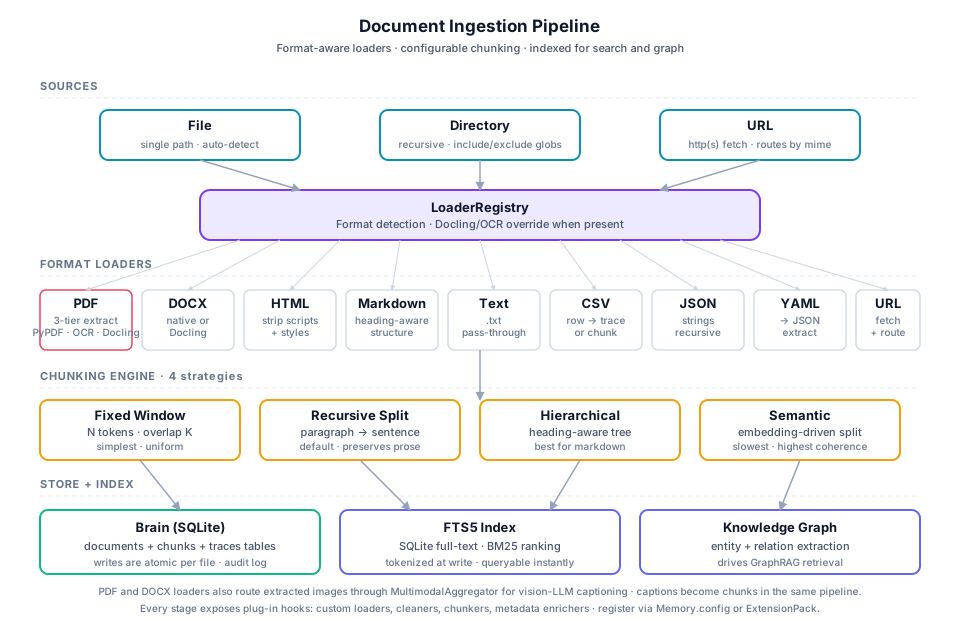
The ingestion pipeline transforms files and URLs into chunked, searchable memory traces stored in the agent's brain.sqlite:
Quick Start
import { Memory } from '@framers/agentos';

const mem = await Memory.createSqlite({ path: './brain.sqlite' });

// Single file
await mem.ingest('./report.pdf');

// Directory with glob filters
await mem.ingest('./docs', {
  recursive: true,
  include: ['**/*.md', '**/*.pdf'],
  exclude: ['**/node_modules/**'],
});

// URL
await mem.ingest('https://example.com/api-docs');

await mem.close();
Supported File Types
| Format | Extensions | Loader | Notes |
|---|---|---|---|
.pdf | PdfLoader | 3-tier extraction (see below) | |
| DOCX | .docx | DocxLoader | Also supports Docling for high fidelity |
| HTML | .html, .htm | HtmlLoader | Strips scripts/styles, extracts text |
| Markdown | .md, .mdx | MarkdownLoader | Preserves heading structure for hierarchical chunking |
| Plain text | .txt | TextLoader | Direct pass-through |
| CSV | .csv | CsvLoader | Each row becomes a trace or chunk |
| JSON | .json | JsonLoader | Extracts string values recursively |
| YAML | .yaml, .yml | YamlLoader | Converted to JSON, then extracted |
| URLs | http://, https:// | UrlLoader | Fetches content, then routes to appropriate loader |
The LoaderRegistry auto-detects the correct loader based on file extension. When Docling or OCR loaders are available in the environment, they automatically override the default handlers for PDF and DOCX.
3-Tier PDF Extraction
PDF extraction uses a cascading strategy that maximises text fidelity while remaining zero-dependency by default:
| Tier | Engine | Activation | Fidelity | Dependencies |
|---|---|---|---|---|
| Tier 1 | unpdf | Always (built-in) | Good for born-digital PDFs | None (pure JS) |
| Tier 2 | tesseract.js OCR | Auto when Tier 1 yields sparse text (< 50 chars/page average) | Handles scanned documents | pnpm add tesseract.js |
| Tier 3 | Docling sidecar | Opt-in via doclingEnabled: true | Highest fidelity (tables, layouts, figures) | pip install docling |
How the Cascade Works
PDF buffer arrives
  │
  ▼
[Tier 1: unpdf]
  │
  ├── Text extraction succeeds and is dense?
  │     └── YES → Return extracted text
  │
  └── Sparse text (< 50 chars/page)?
        │
        ▼
      [Tier 2: tesseract.js OCR]  (if installed)
        │
        └── Return OCR text

[Tier 3: Docling]  (if doclingEnabled)
  │
  └── Bypasses Tier 1+2 entirely
      Runs `python3 -m docling --output-format json <file>`
      Returns high-fidelity structured extraction
Configuration
const mem = await Memory.createSqlite({
  path: './brain.sqlite',
  ingestion: {
    extractImages: true,   // Pull images from PDFs/DOCX
    ocrEnabled: true,      // Allow tesseract.js fallback
    doclingEnabled: false,  // Opt into Docling sidecar
  },
});
Chunking Strategies
The ChunkingEngine splits document text into indexable chunks. Four strategies are available:
| Strategy | Best For | Algorithm |
|---|---|---|
fixed | General-purpose, predictable sizing | Split at character count with word-boundary awareness and configurable overlap |
semantic | Topic-coherent chunks | Embed individual sentences, split where cosine similarity drops below threshold |
hierarchical | Markdown documents with heading structure | Each heading creates a chunk boundary; long sections sub-split with fixed |
layout | Code-heavy or table-heavy documents | Preserve fenced code blocks and pipe-delimited tables as atomic chunks |
Configuration
const mem = await Memory.createSqlite({
  path: './brain.sqlite',
  ingestion: {
    chunkStrategy: 'semantic',   // 'fixed' | 'semantic' | 'hierarchical' | 'layout'
    chunkSize: 512,              // Target characters per chunk
    chunkOverlap: 64,            // Overlap between consecutive chunks
  },
});
Strategy Details
Fixed splits at a fixed character count, snapping to the nearest word boundary. The chunkOverlap parameter (default 64 chars) controls how much text is repeated between consecutive chunks to prevent context loss at split boundaries.
Semantic requires an embedding function. It embeds individual sentences, then splits wherever cosine similarity between adjacent sentences drops below a threshold (topic boundary detection). Falls back to fixed when no embedFn is supplied.
Hierarchical respects Markdown heading structure (#, ##, ###, etc.). Each heading creates a new chunk boundary, with the heading text stored in chunk metadata. Sections that exceed chunkSize are sub-split using the fixed strategy.
Layout detects fenced code blocks (```) and pipe-delimited tables (| col |) and preserves them as atomic chunks. Surrounding prose is split with fixed. This prevents code snippets and data tables from being cut mid-content.
FolderScanner
FolderScanner provides recursive directory ingestion with glob-based filtering via minimatch:
// Ingest an entire documentation folder
const result = await mem.ingest('./project/docs', {
  recursive: true,
  include: ['**/*.md', '**/*.pdf', '**/*.txt'],
  exclude: ['**/node_modules/**', '**/.git/**', '**/dist/**'],
  onProgress: (processed, total, current) => {
    console.log(`[${processed}/${total}] ${current}`);
  },
});

console.log(`Succeeded: ${result.succeeded.length}`);
console.log(`Failed: ${result.failed.length}`);
console.log(`Chunks created: ${result.chunksCreated}`);
console.log(`Traces created: ${result.tracesCreated}`);
Behaviour
- When
recursiveisfalse(default), only direct children of the directory are processed. includepatterns are evaluated first; only matching files are considered.excludepatterns are evaluated second; matching files are skipped.- Patterns are matched against the path relative to the scanned root directory.
- A single unreadable or unparseable file never aborts the entire scan --- errors are collected in
result.failed. - The
onProgresscallback fires after each file attempt (success or failure).
IngestResult
interface IngestResult {
  succeeded: string[];                         // Absolute paths of ingested files
  failed: Array<{ path: string; error: string }>; // Files that could not be processed
  chunksCreated: number;                       // Total chunks stored
  tracesCreated: number;                       // Total memory traces created
}
MultimodalAggregator
When extractImages: true is configured, document loaders (PDF, DOCX) extract embedded images as ExtractedImage objects. The MultimodalAggregator enriches them with natural-language captions via a vision-capable LLM:
const mem = await Memory.createSqlite({
  path: './brain.sqlite',
  ingestion: {
    extractImages: true,
    visionLlm: 'gpt-4o',   // Model used for image captioning
  },
});

await mem.ingest('./slides.pdf');
// Images are extracted, captioned, and stored in document_images table
How It Works
- Document loaders produce
ExtractedImageobjects (raw bytes + MIME type + optional page number). MultimodalAggregatorreceives the image batch and calls thedescribeImagefunction for each image lacking a caption.- Images are processed in parallel via
Promise.allSettled--- a single failed captioning attempt does not block the rest. - Failed images retain their un-captioned state rather than propagating errors.
- Captions are stored in the
document_images.captioncolumn and indexed for text retrieval.
Passthrough Mode
When no describeImage function is configured, the aggregator passes images through unchanged. This is the default behaviour when visionLlm is not set.
URL Ingestion
The UrlLoader fetches content from HTTP/HTTPS URLs and routes it through the appropriate document loader:
// Single URL
await mem.ingest('https://docs.example.com/guide');

// The UrlLoader:
// 1. Fetches the URL via HTTP GET
// 2. Detects content type from response headers
// 3. Routes to HtmlLoader, MarkdownLoader, etc.
// 4. Chunks and stores as memory traces
Idempotent Re-Ingestion
Every ingested document is tracked in the documents table with a SHA-256 content_hash. When the same file is ingested again:
- If the content hash matches the previously ingested version, the file is skipped.
- If the content has changed, the old chunks are replaced with the new extraction.
This makes it safe to re-run ingestion on the same directory without creating duplicates.
For a flat vector collection without the cognitive-memory brain (doc citations, a help index, a product knowledge base), the same content-hash skip is a short recipe over IVectorStore directly. See Incremental Vector Ingestion.
Configuration Reference
All ingestion options can be set at the Memory constructor level (applied to every ingest() call) or per-call:
| Option | Default | Description |
|---|---|---|
chunkStrategy | 'semantic' | Chunking algorithm: fixed, semantic, hierarchical, layout |
chunkSize | 512 | Target character count per chunk |
chunkOverlap | 64 | Character overlap between consecutive chunks |
extractImages | false | Extract embedded images from PDF/DOCX |
ocrEnabled | false | Allow tesseract.js fallback for sparse PDFs |
doclingEnabled | false | Use Docling sidecar for high-fidelity extraction |
visionLlm | undefined | Vision model for image captioning |
recursive | false | Descend into subdirectories (per-call) |
include | undefined | Glob patterns to include (per-call) |
exclude | undefined | Glob patterns to exclude (per-call) |
Source Files
| File | Purpose |
|---|---|
memory/ingestion/LoaderRegistry.ts | Auto-detection and loader dispatch |
memory/ingestion/PdfLoader.ts | 3-tier PDF extraction (unpdf + OCR + Docling) |
memory/ingestion/OcrPdfLoader.ts | tesseract.js OCR fallback |
memory/ingestion/DoclingLoader.ts | Python Docling sidecar |
memory/ingestion/FolderScanner.ts | Recursive directory walking |
memory/ingestion/ChunkingEngine.ts | 4-strategy chunking |
memory/ingestion/MultimodalAggregator.ts | Image caption enrichment |
memory/ingestion/UrlLoader.ts | HTTP/HTTPS URL fetching |
memory/facade/types.ts | IngestOptions, IngestResult, IngestionConfig |